PayPal has been one of the most widely used payment platforms in the world, but it has not always been fully functional in Nigeria. It is fast, reliable, safe, and can easily process disputes where a refund is necessary, or the product/service does not meet promised specifications.
This post may contain affiliate links. If you use them, I may earn a small commission at no extra cost to you.
But due to unclear reasons, PayPal restricted Nigerian users from accessing the full functionalities of the platform. Nigerian PayPal users could not receive money or link a bank or card for withdrawal. Because of this, many Nigerians doing legitimate online business or freelancing have lost funds directly or found it hard to receive money from their international clients.
However, research has led us to find new ways to boycott the restrictions legally without violating PayPal’s policies. With these methods, Nigerian freelancers and digital workers have been using PayPal to send and receive funds from international clients, as well as withdraw the funds into their local bank accounts when needed.
As of early 2026, through a partnership with Paga, PayPal now allows Nigerian users to create accounts to send money, receive international funds, hold funds in USD, and withdraw in Naira.
In this post, we will explore two ways to create a working PayPal account that can send, receive, and withdraw funds. The first is the old method that bypasses PayPal’s restrictions legitimately, while the second is this new method recently approved through the PayPal-Paga partnership.
Why You Need a PayPal Account
Whether you are tired or frustrated with PayPal or not, there will certainly be moments when you will need a PayPal account. This is due to the following reasons:
- PayPal remains the most popular payment method for consumers and businesses globally.
- It is easy to set up and use.
- It is easy to resolve payment disputes, thus building trust in users.
Thus, as a freelancer, digital creator, affiliate marketer, etcetera, in Nigeria, having a fully functional PayPal account is an invaluable asset that can simplify how you pay and get paid doing business online.
How To Open a PayPal Account (Method 1)
While PayPal has always blocked Nigerian users from creating accounts normally, they “secretly” allowed Nigerians to register as business accounts to operate fully for sending and receiving international payments. However, this hack is not available to everyone.
After several trials and failures, and information from fellow researchers, we discovered an easy way to open a fully functional PayPal account that worked throughout 2025 and is still working till today.
Requirements for Opening a Functional Nigerian PayPal Account
You don’t need a VPN or a US phone number to create a fully functional PayPal account in Nigeria. Here is all you need:
- A valid email address not already used for another PayPal account.
- A valid and active Nigerian phone number.
- An official Identity Card (NIN, Voters’ Card, or International Passport).
- An internet-enabled device (smartphone or laptop) with an internet connection.
Steps For Opening a Functional PayPal Account (Method 1)
PayPal accounts come in two categories: the personal account and the business account. As mentioned earlier, PayPal can work for Nigerian users if the account is registered as a business account.
The steps for opening a fully functional PayPal account in Nigeria include the following:
- Account creation and activation
- Email confirmation and registration completion
- Opening a linkable US bank account
- Linking your US bank account to PayPal for fund withdrawal
Step 1: Account Creation and Activation
Here is a step-by-step process of opening and activating a new PayPal account in Nigeria.
- Visit a non-Nigerian PayPal homepage outside the US. (Monaco homepage has been working. So I recommend using this link)
- Translate the page from French using the automatic pop-up that appears if you can’t read the language.
- Next, click on the “Sign Up” button shown below. (The interface might be different now)
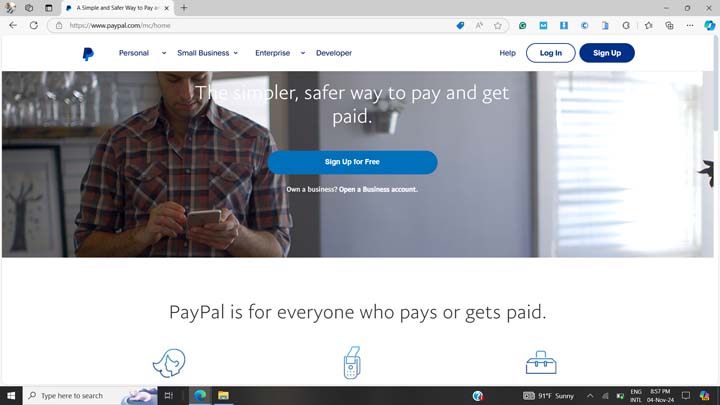
- On the page that opens up, select “Business Account” and click on the “Continue” button shown below.
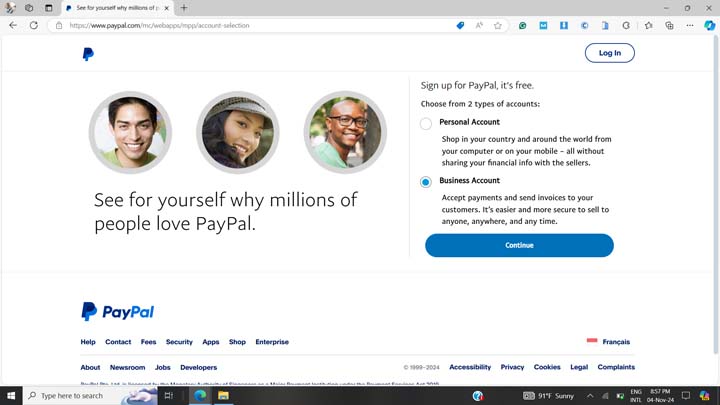
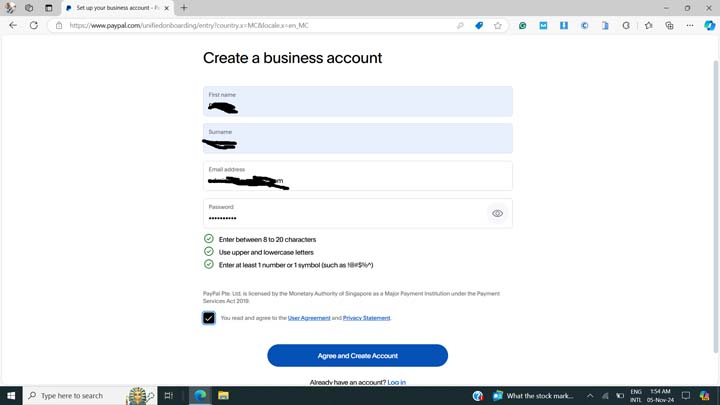
- On the next page, fill in your first name, surname, a phone number, a valid email not already associated with another PayPal account, and a desired password.
- In the phone number section, select “+234” as the phone code with the Nigerian flag.
- Then, tick the checkbox saying “You read and agree to the User Agreement and Privacy Statement”.
- Finally, click on the Agree and Create Account” button at the bottom of the page.
Section 2: Confirming email and Completing Registration
This step allows PayPal to verify your email ownership and collect essential information for your business account.
- Click on the link sent to your provided email in the previous section.
- You may see the email confirmation button written in French like “Confirmer votre adresse email”. Go ahead and click on it.
- On the next page that says “your email has been confirmed”, click on the “Continue” button.
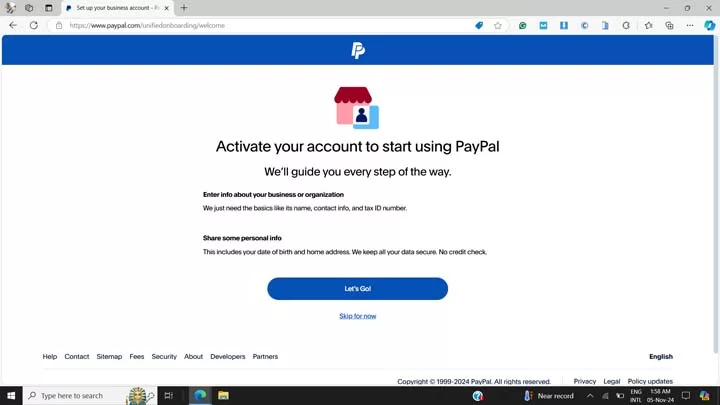
- Next, click on the “Let’s Go!” button to complete your registration.
- If you confirmed your email using a different browser, you will be required to log in with your email and your earlier chosen password.
- Next, click on the “Complete your profile” link.
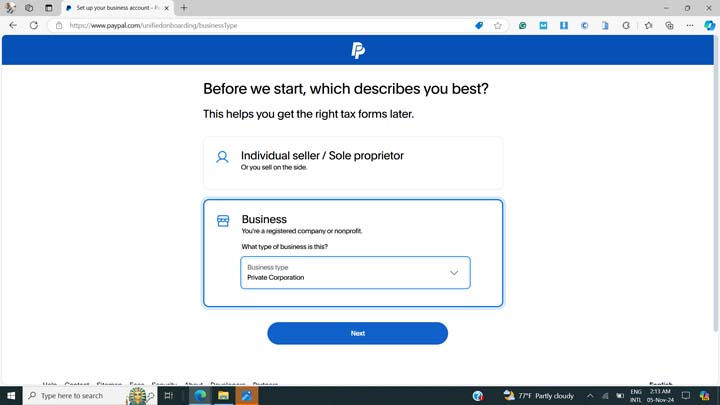
- Next, fill in the account type that best describes your business. Preferably, select “Business” and choose “Private Corporation” as your business type, as shown below.
- Then click the “Next” button.
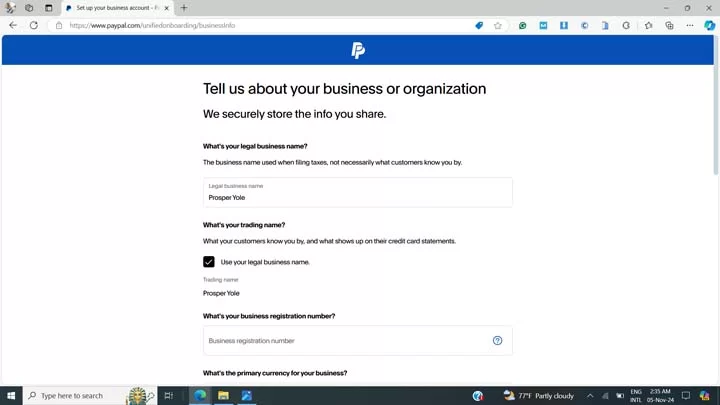
- In the next step, fill in your name as your legal business name. Make sure some part of the name is identical to your ID document, even if not exactly.
- Next, tick the “Use your legal name” checkbox to use your legal name above as your business/trading name, unless you want to use a different name for your PayPal business account.
- Skip the business registration number section if your business is not yet registered with the CAC; otherwise, enter the details in the next input field.
- Next, select “US Dollar” as your primary currency. (shown below)
- Select the service option that best matches what you plan to use your account for. For example, select “Miscellaneous Publishing and Printing”, “Digital Goods”, or Miscellaneous Personal Services” options if you are a freelancer, as may be relevant to your services.
- Next, if you have a business website, select “Yes” and enter your website in the form field; otherwise, select “No”.
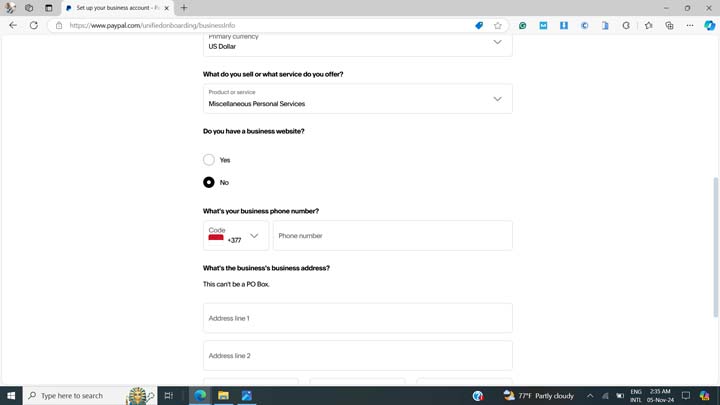
- In the form field above, enter your valid phone number starting with +234 and without the first zero.
- Then, fill in your business address or current residential address, postal code, and other relevant fields, and finally click on the “Next” button below.
- If unsure of the postal code or if PayPal cannot validate your address, leave the postal code blank.
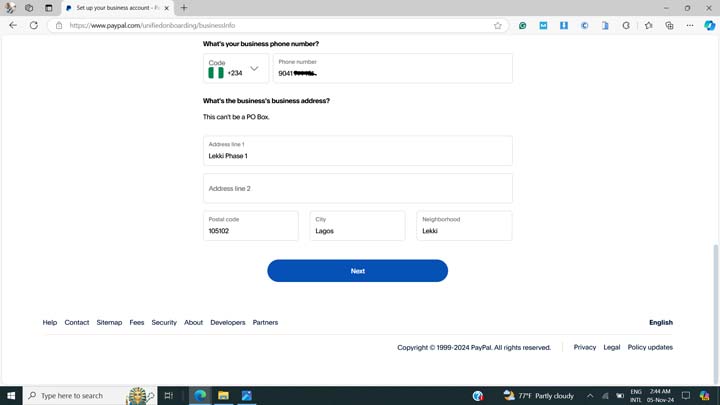
- In the next session (shown below), enter your date of birth and select Nigeria as your nationality. Ensure the date of birth matches the details in your valid identity document.
- Next, type in your residential address or tick the checkbox beside “Same as registered business address”, especially if you don’t have a dedicated business address.
- Finally, click on the “Next” button to complete your registration.
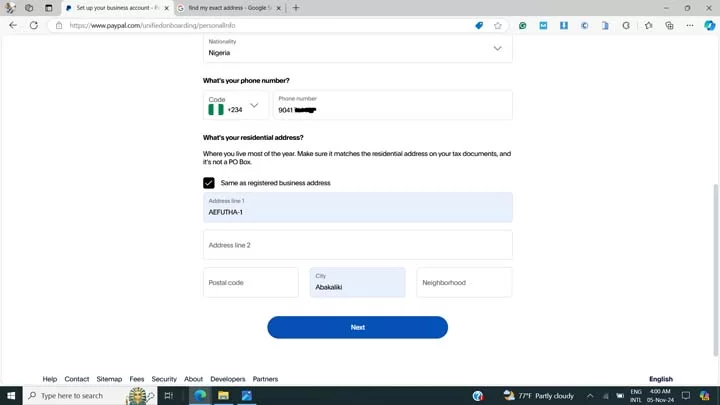
That’s all! Your PayPal account is ready for all transactions.
Shortly later, PayPal may ask you to verify some tax information about your business. Select tax is not applicable, and proceed. As of now, you don’t have to change any information or submit any business documents.
Lastly, change your preferred account language from French to English using the steps below:
- Go to Account Settings>Account Preferences and update your preferred language from Français to English.
Section 3: Opening a linkable US bank account
For most people who were able to successfully create a functional PayPal account, finding a bank or card that allows them to withdraw funds can be a serious challenge. Previously, some Nigerian cards once worked, but these got banned at some point, making withdrawing money from PayPal very difficult.
Here is the method that currently works for me and others I have shown this method to.
- Create a Cleva account by visiting this link using a mobile or desktop browser.
- Fill in your registration details as appropriate. Ensure the details correspond with your official identity document (NIN, Voters’ card, or International Passport).
- Then, confirm your registration by clicking on the link sent to your email.
- Next, upload any official document as may be required. NIN is okay if you have it.
- After submitting the required documents, it will take around 24 hours for your account to be verified.
- Once verified, you will get an email saying “your account has been verified.”
- Next, log in to your GetCleva account or download the app from the Play Store or App Store.
- After signing in, find the link to open a US bank account in one click. Proceed to creating your US account.
- You also have the option to create a US Dollar Mastercard you can use for other transactions
Section 4: Linking your bank account
Now that you have your US bank account, here is how to link it to your PayPal account and start receiving and withdrawing money.
- Log in to your PayPal account using any country’s PayPal login page.
- Navigate to the “Pay and Get Paid” tab or click on the “Transfer Money” link on your dashboard if you have already received some money into the account.
- Select the option to add a bank account.
- Open a new tab and log in to your GetCleva dashboard, or log in to the mobile app.
- Then, click on Add Funds in your GetCleva dashboard.
- Look for your account details like bank name, routing number, account type, etc. What you need for PayPal is your routing number and account number.
- Head back to your PayPal and select “Checking” as your account type.
- Then, copy and paste the routing number and account number from GetCleva into their respective fields on the page.
- Finally, click on the submit button.
- If the details fail to verify on PayPal, contact GetCleva customer support for the correct details for your account.
- PayPal will send micro-deposits to your GetCleva account 1-2 days later and ask you to enter the amount of the micro-deposit in a form on the PayPal platform. This is for verification purposes, and you will get an email notification when the micro-deposits arrive in your Cleva account.
- Once that is done, your US bank account will be successfully linked, and you can start receiving and withdrawing money into it.
Withdrawal fee from PayPal to your Cleva account is free, but Cleva may charge a small fee when it arrives in the US bank account provided. You can then easily convert your USD to Naira at a good rate for spending or Naira savings.
PayPal-Paga Partnership Method
Using this method, you don’t have to use another country’s registration page to sign up for a PayPal account in Nigeria. The requirements are similar to those in method 1.
Here are the steps:
- Creating a Nigerian PayPal
- Creating a Paga Wallet
- Linking your Paga Wallet to PayPal
Step 1: Creating a Nigerian PayPal
- Sign up for your PayPal account using the PayPal Nigeria homepage. You will notice that the page does not have a business account option.
- Proceed to create a personal PayPal account.
- Fill in the relevant details similar to the previous method.
- Fill all other fields as discussed in the first method above.
- Finally, log in to your active PayPal account.
Step 2: Creating a Paga Wallet
- Download the Paga app on the Play Store or App Store.
- Click on sign up
- Select your primary account (Nigerian or US account, whichever, but preferably, start with the Nigerian account)
- Provide your phone number and verify the OTP.
- Provide your NIN and complete your KYC.
- Fill in all the other required details as you will see on your screen.
- Then, proceed to your dashboard.
- Complete your details as would be displayed at the top of the dashboard page.
Step 3: Linking your Paga Wallet to PayPal
- After completing your employment details, click on the currency option at the top-right corner of the app.
- Then, select PayPal from the list that displays.
- Provide your NIN and repeat your KYC if the app asks for it.
- Proceed as prompted, and click on the Connect PayPal button on the next screen.
- This will take you to the PayPal login page.
- Agree to the terms and continue to connect Paga to your PayPal.
- Once that is done, you will then be able to see your PayPal balance in your Paga Wallet.
- Congratulations! You can now view and withdraw your PayPal funds all from the Paga app.
Alternatives to PayPal for Nigerians
Though PayPal is the most widely used international payment platform, other newer platforms have been introduced lately. These newer platforms helped to fill the void for Nigerians when PayPal was not available.
Popular alternatives include:
- Payoneer
- Grey
- ChipperCash
- Geegpay
- Cleva
- Crypto transfer
- Raenest
- Bank transfer via SWIFT/BIC
- Western Union
Ever since the news of PayPal coming back to Nigeria, many Nigerians have expressed disappointment on social media. Some say they have moved on from PayPal, as the platform disappointed them when they needed it the most.
Others express how they have lost money through blocked funds on the platform. A few expressed that PayPal should implement a system to refund the funds Nigerians have lost during the years of trying to use the app.
Wise, Skrill, and Remitly are other options, but are not currently available to Nigerians.
Other Methods to Withdraw Money From PayPal
If your PayPal account does not allow fund withdrawal, here are some workarounds to withdraw your funds from PayPal.
- Transfer to a friend in the diaspora: If your PayPal account can receive funds but you can’t withdraw them directly, there are high chances that you have a friend in the US or UK that you can send the money to. Once they receive the funds in their PayPal account, they can send them to your Nigerian bank account via various channels.
- Use a trusted PayPal exchanger: Some trusted online platforms offer to exchange your PayPal funds at a good rate. These platforms are fast, reliable, and relatively safe, but be sure to verify before using any such platforms for your transfers. Examples include fnfswap.com.ng or xchange.com.ng.
- Lastly, find individuals close to you who can receive your PayPal funds at an agreed rate. These may offer low conversion rates, but you can sell to them if they offer a rate you are quite comfortable with.
Frequently Asked Questions
Will my PayPal account be blocked?
No, as long as you provide all required documents and use the account for legit business, you can continue to use your PayPal account without any issues.
How is a personal account different from a business account?
A personal account allows money gifts and doesn't charge any fee for these transactions. However, all transfers to or from a business are considered transactional and require transaction charges. PayPal may also ask for proof of transactions for a business account.
How much does PayPal charge when transferring money to a linked bank account?
PayPal generally does not charge any fee when transferring money to your linked bank account. However, if you are using Cleva, the platform may charge of 0.9% of ACH transfers, with a minimum of $1 and a maximum of $20.
Can I confidently contact PayPal support if any issues?
Yes, you can safely contact support when you have any issues without being afraid of "exposing yourself". As long as you are doing legitimate transactions and have your documents, you have nothing to worry about.
How much does PayPal charge for receiving money?
PayPal charges and deducts around 2.99% of the amount you receive. So, if you receive $200 into your business account, the final amount may be around $190.
Are Nigerian debit cards supported on PayPal for withdrawal?
No, Nigerian debit cards are currently not accepted for PayPal withdrawal. Even if you successfully link it, it will only be available for sending payment or making orders, not withdrawing funds.
Do I need a tax ID or EIN for PayPal in Nigeria?
No, you don't need a tax ID or EIN to operate a PayPal account in Nigeria. However, with this new Paga integration, this may soon be implemented by the regulating bodies.
What should I do if PayPal requests for verification frequently?
When PayPal asks you to verify your identity, it may mean that you have logged in frequently from different devices. Simply provide your government-issued documents or active phone number to verify your account.
Is Cleva account free?
Yes, opening a Cleva account is free using this link here.
Final words
Opening a fully functional PayPal account is now possible. The Paga partnership with the platform makes it even easier.
These methods are tried and tested methods you can use to open and operate a fully functioning PayPal account in Nigeria in 2026. If you found this helpful or have any questions, let me know in the comments section below.











You Might Also Like