Since 2004, Nigerian PayPal accounts have had limited functionality, particularly for receiving money and withdrawing funds locally. This has dealt a significant blow to Nigerian freelancers and digital workers who legitimately work online until now, when the PayPal-Paga integration introduces a more practical way to create a fully working PayPal account in Nigeria.
This post may contain affiliate links. If you use them, I may earn a small commission at no extra cost to you.
PayPal remains a popular choice of international payment by clients from many countries. It is fast, reliable, secure, and can easily process transaction disputes where a refund is necessary, or the product/service does not meet promised specifications. Due to this, the restriction on PayPal services in Nigeria significantly affected the ease with which Nigerians conduct legitimate transactions internationally.
Since then, Nigerians have discovered new methods to work around the restrictions while still enjoying the full benefits of PayPal services. With these methods, one can receive funds via PayPal, hold funds in USD, make payments for products or services, and transfer funds for local use in Naira.
One of these methods is creating a fully functional business PayPal account through an official PayPal registration page with correct Nigerian details and phone number. The second and more recent method is through PayPal-Paga partners introduced in early 2026.
In this guide, we will go into detail on how to create a working PayPal account in Nigeria. From now on, you no longer have to lose legitimate clients or international jobs as a Nigerian simply because you don’t have a PayPal account.
Since early 2026, Nigerians can now open a fully functional PayPal account with their personal Nigerian details. The 2026 PayPal-Paga integration provides an easy way to send, receive, and withdraw money using PayPal. Fees, eligibility, and limits may vary for transactions via any of the working methods, so it is necessary to review the terms before you begin using them.
Can You Use PayPal in Nigeria in 2026?
Yes. Nigerians can now create fully functional PayPal accounts for both personal and business use. This allows Nigerian users to send, receive, make payments, and withdraw funds from PayPal.
Paga provides an official way to connect a Nigerian PayPal account to a local wallet. Through the official Paga-PayPal integration, eligible Nigerian users can receive international payments and withdraw their PayPal balance in Naira or USD.
The business account route does not rely on Paga integration to work, and this Paga method is currently more reliable than the business account method. The registration may not work for some people.
Difference Between PayPal Business Account and Paga-PayPal
Below are some important differences between PayPal accounts created via the business account route and the Paga integration.
| Features | Business PayPal | Paga-PayPal |
|---|---|---|
| Open a personal account | No | Yes |
| Open a business account | Yes | No |
| Withdrawal provider | Cleva or another eligible account | Paga |
| Send and receive funds | Yes | Yes |
| Withdrawal | Through Cleva or eligible debit card | Through Paga |
| Local funding | Unavailable | Funding via Paga coming soon |
| Conversion rate | Good (approaches black market rates) | Paga conversion rates (good) |
| Withdrawal charges | Free + $2 Cleva charges | $3 plus 3% of the withdrawal amount |
| Transfer fee to local bank | Free | Free for the first 10 transfers a month |
| Ease of opening an account | PayPal may block or reject registration | Reliable |
Table comparing the differences between PayPal accounts created via the unified business account page and via Paga integration.
Requirements for Opening a PayPal Account in Nigeria
To get started with a new PayPal account that works fully in Nigeria, here are the requirements.
- A valid email address not already linked to another PayPal account.
- An active Nigerian phone you have access to.
- A government-issued identity document bearing your legal name (NIN, voter’s card, international passport, etc.)
- A smartphone or computer with an active internet connection.
- A Paga account for the Paga integration method.
- Tax ID, if applicable.
What you don’t need:
- A VPN
- US, UK, or any foreign phone number
- Foreign IP
- A US bank account or Social Security
- Fake personal details or address.
How to Open a Personal PayPal Account in Nigeria
A personal PayPal is a non-business account for individuals. It can send money and make online payments through a linked debit card, but it cannot be used to receive money. However, through the Paga-PayPal partnership, this personal account can now be used for receiving money.
PayPal never blocked Nigerians from creating a personal account, but the features were limited. Through the Paga integration, you can now create a personal PayPal account that works as intended.
Step 1: Open the Personal Account Registration Page
- Visit the Nigerian PayPal homepage on your device
- Click on Sign Up in the header navigation
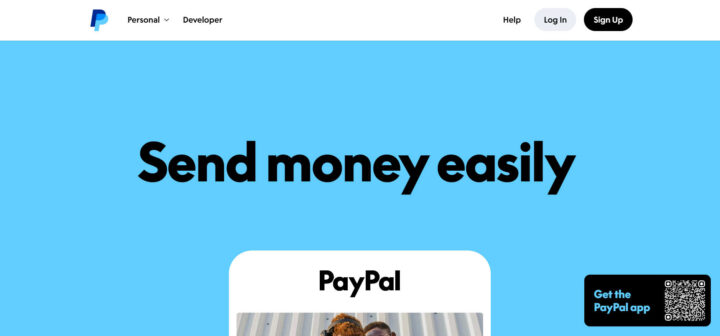
- On the next page, leave the Nigerian flag selected
Step 2: Choose an Email and Verify Phone Number
- Enter your email address and click “Next“
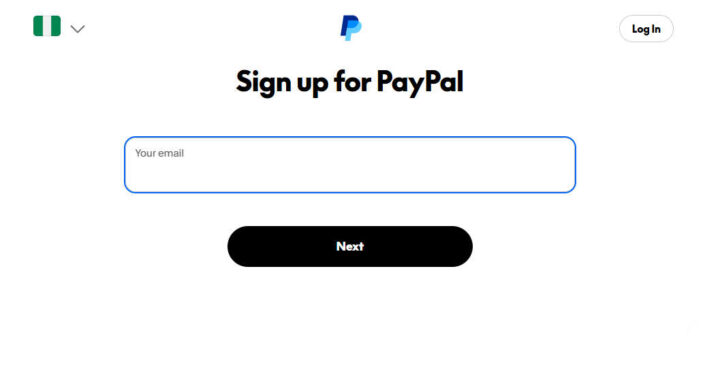
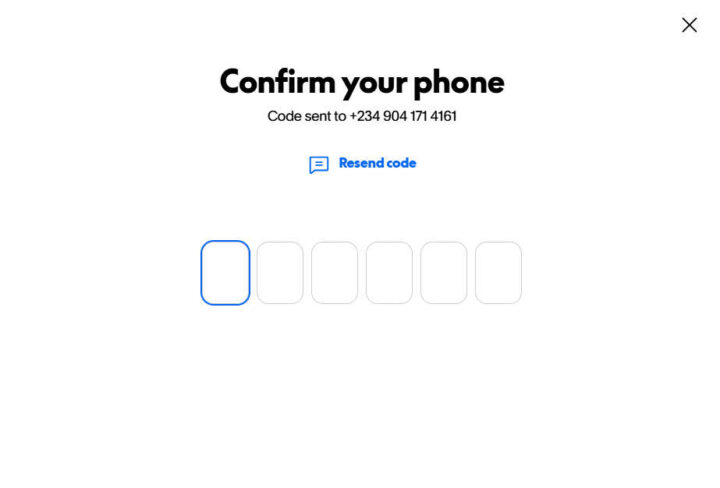
- On the next page, enter your Nigerian phone number starting with +234
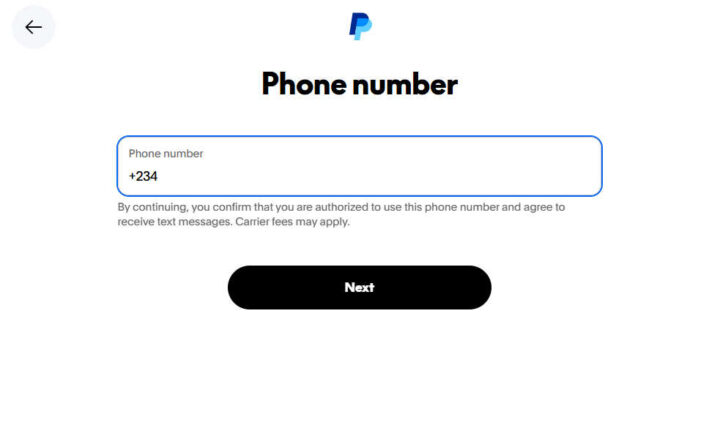
- Then, enter the verification code sent to your phone (Click resend if no code was received)
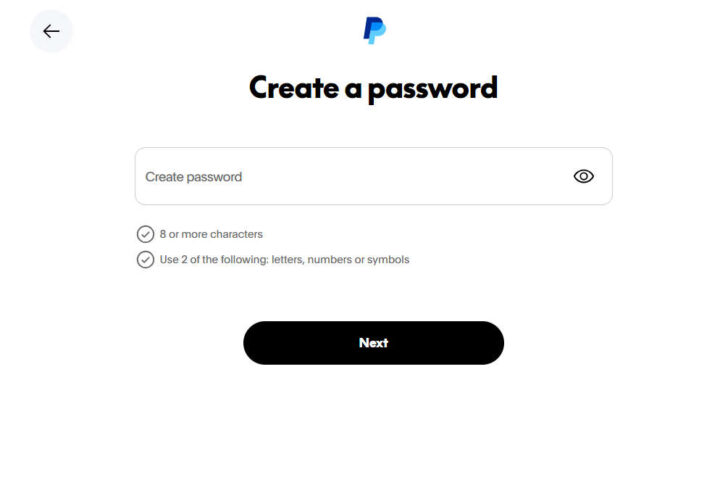
Step 3: Choose a Desired Password and Enter Personal Details
- Then, enter your desired password on the next screen
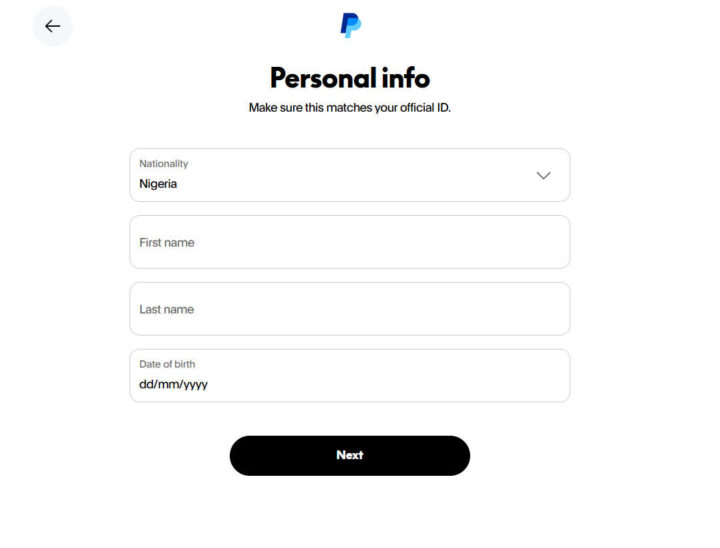
- Enter your personal details, including first name, last name, and date of birth. Leave Nigeria selected as nationality
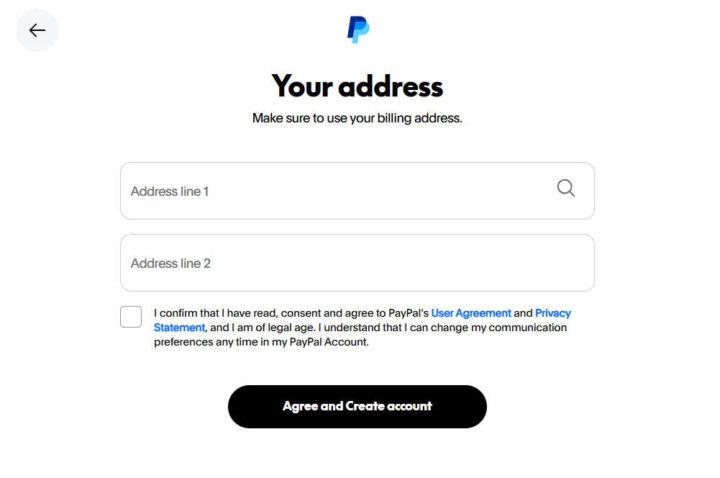
- Then, fill in your address or current address
- Select that you confirm and have read PayPal’s User Agreement and Privacy Statement.
- Click “Agree and Create Account”
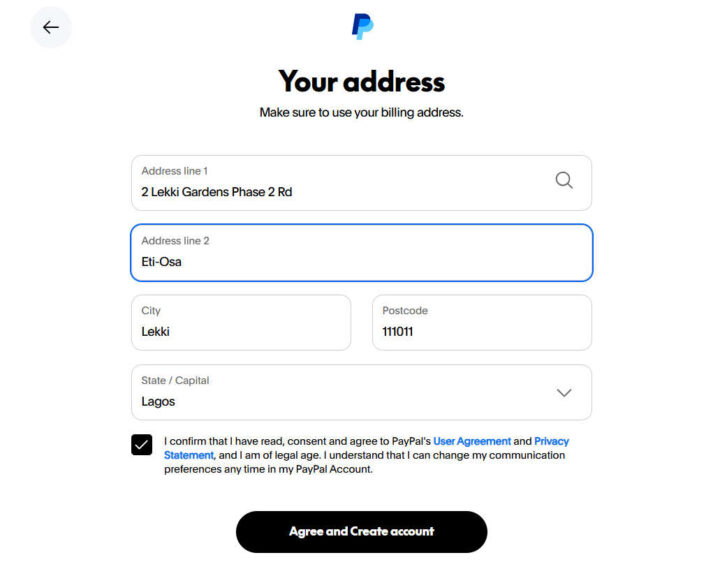
Step 4: Verify Your Identity and Biometric Verification
- Then, scan the barcode on the next screen with your smartphone if you used your computer
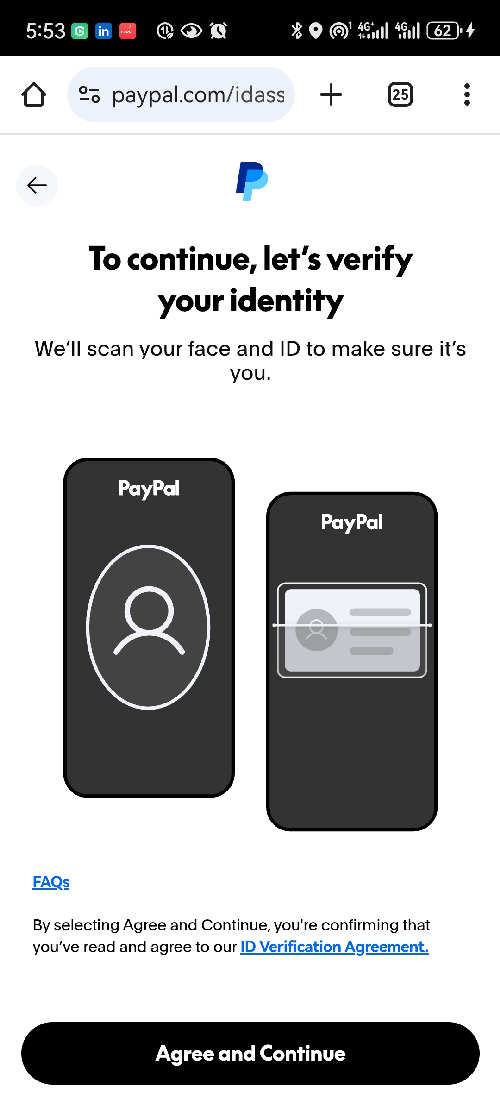
- Next, verify your identity by clicking “Agree and Continue” on your phone
- Then scan your face
- Then, select which ID document to scan (driver’s license or international passport), and scan it
- After this, you will be asked to return to the desktop page to continue
Step 5: Link Card and Verify Email
- On the desktop page, select “Not Sure? Add card to use later.”
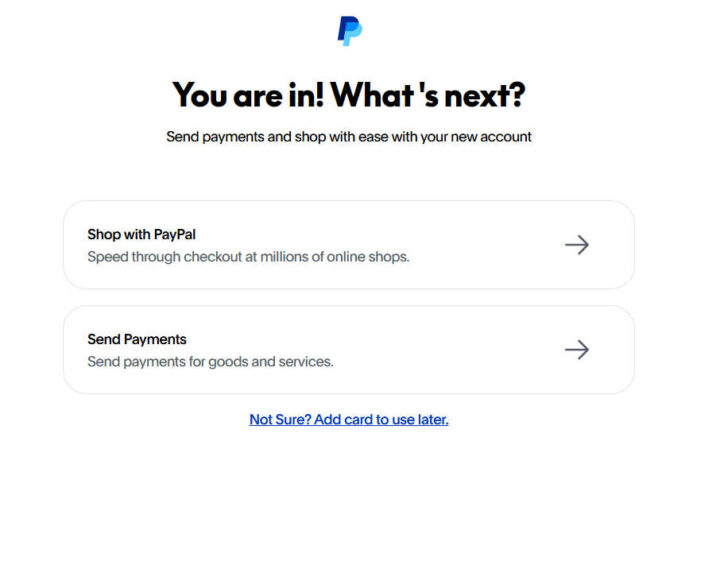
- On the next page for linking a card, select “Not now”
- Lastly, verify your email by entering the code sent to your inbox
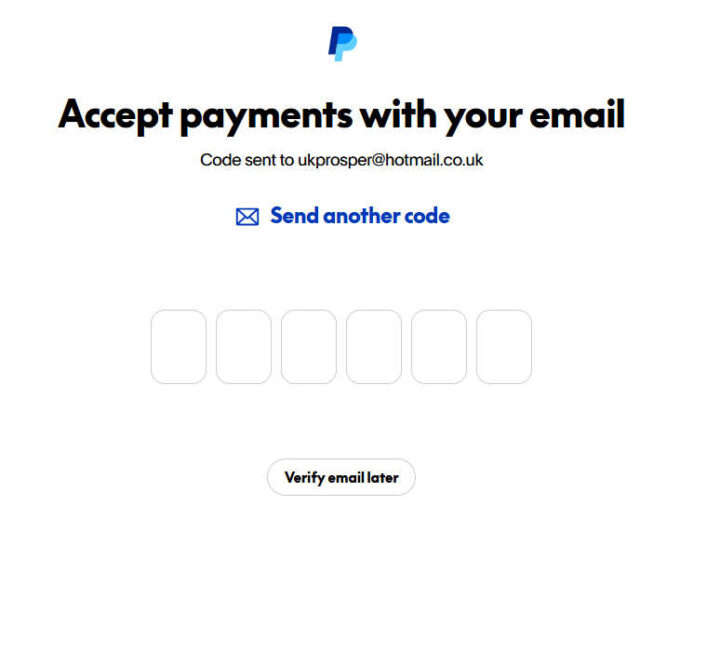
- And that’s all. You are in!
The next step will be how to link it to your Paga account to receive and withdraw money.
How to Link Paga to PayPal for Withdrawals
Withdrawing from a personal PayPal account requires connecting it to Paga. You can review the service and download the app from the official Paga-PayPal page.
Below are the steps.
Step 1: Download and Create a Paga Wallet
- Download the Paga app on the Play Store or App Store
- Then sign up or log in if you already have an account
- Select your primary account (Nigerian or US account, whichever; preferably, start with the Nigerian account)
- Provide your phone number and verify the OTP.
- Provide your NIN and complete your KYC.
- Fill in all the other required details as you will see on your screen.
- Then, proceed to your dashboard.
- Complete your details as displayed at the top of the dashboard page.
Step 2: Linking your Paga Wallet to PayPal
- After completing your employment details, click on the currency option at the top-right corner of the app.
- Then, select PayPal from the list that displays.
- Provide your NIN and repeat your KYC if the app asks for it.
- Proceed as prompted, and click on the Connect PayPal button on the next screen.
- This will take you to the PayPal login page.
- Log in with your existing PayPal account created in the previous section above.
- Agree to the terms and continue to connect Paga to your PayPal.
- Once that is done, you will then be able to see your PayPal balance in your Paga Wallet.
- Congratulations! You can now view your PayPal balance, hold funds, and withdraw your PayPal funds all from the Paga app.
How to Create a Business PayPal Account
Creating a business PayPal account is the method that existed before the official Paga integration. It involves using the Unified Business PayPal registration page. However, this method may not work because I have not tested it recently.
Step 1: Account Creation and Activation
- Visit a non-Nigerian PayPal homepage outside the US. (This Monaco homepage once worked.)
- Translate the page from French using the automatic pop-up that appears if you can’t read the language.
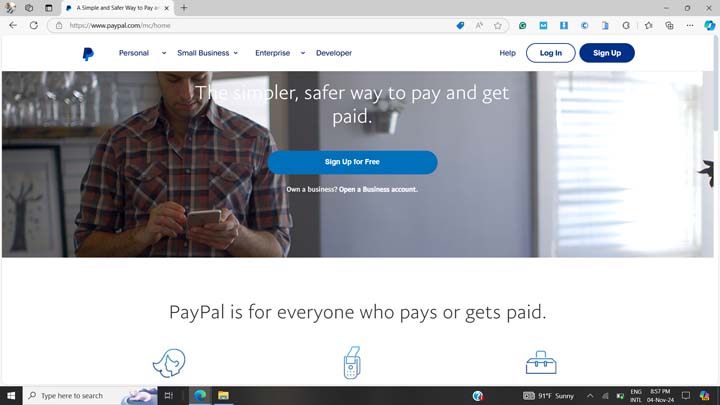
- Next, click on the “Sign Up” button shown below. (The interface might be different now)
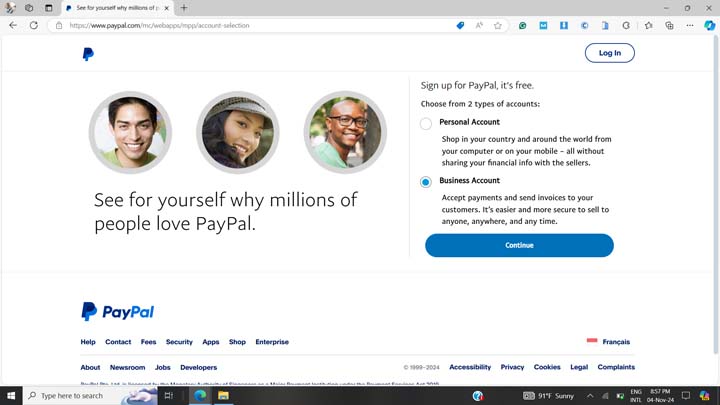
- On the page that opens up, select “Business Account” or “Company” in the new interface and click on the “Continue” button shown below.
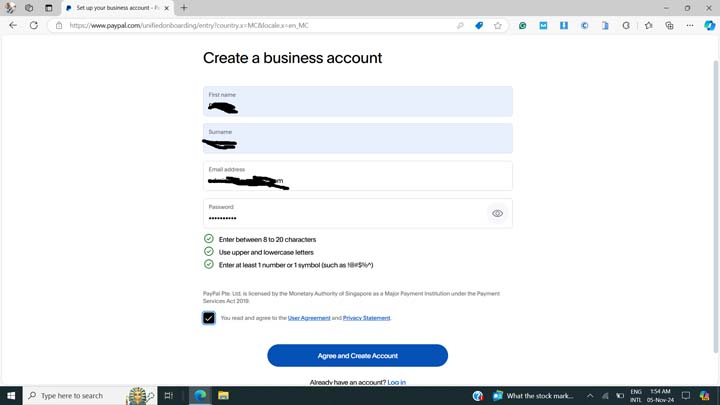
- On the next page, fill in your first name, surname, a phone number, a valid email not already associated with another PayPal account, and a desired password.
- In the phone number section, select “+234” as the phone code with the Nigerian flag.
- Then, tick the checkbox saying “You read and agree to the User Agreement and Privacy Statement”.
- Finally, click on the Agree and Create Account” button at the bottom of the page.
Step 2: Confirm Your Email and Complete Registration
- Click on the link sent to your provided email in the previous section.
- You may see the email confirmation button written in French, like “Confirmer votre adresse email”. Go ahead and click on it.
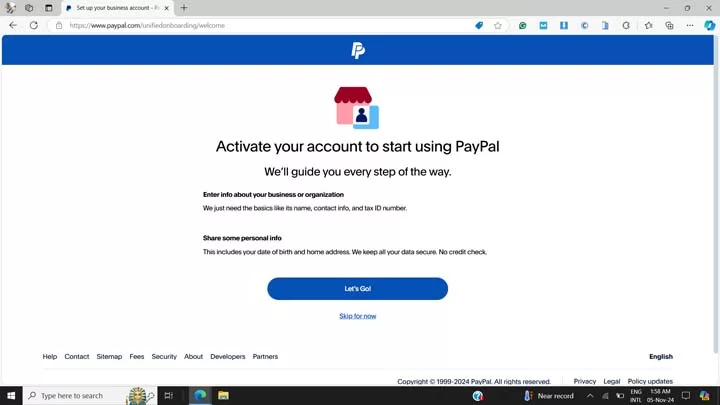
- On the next page that says “Your email has been confirmed”, click on the “Continue” button.
- Next, click on the “Let’s Go!” button to complete your registration.
- If you confirmed your email using a different browser, you will be required to log in with your email and your previously chosen password.
- Next, click on the “Complete your profile” link.
- Next, fill in the account type that best describes your business. Preferably, select “Business” and choose “Private Corporation” as your business type, as shown below.
- Then click the “Next” button.
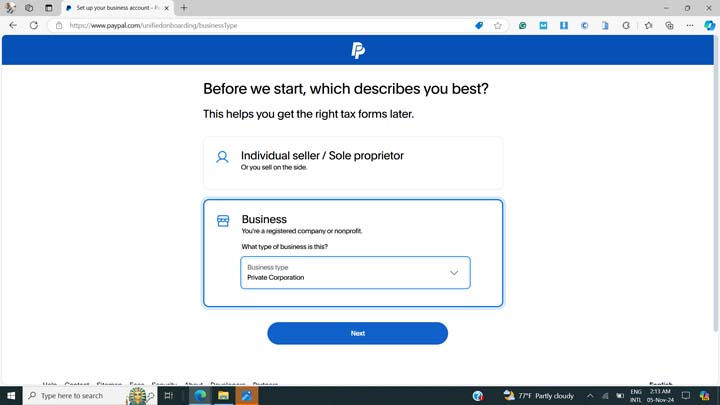
- In the next step, fill in your name as your legal business name. Your name should match your ID document.
- Next, tick the “Use your legal name” checkbox to use your legal name above as your business/trading name, unless you want to use a different name for your PayPal business account.
- Skip the business registration number section if your business is not yet registered with the CAC; otherwise, enter the details in the next input field.
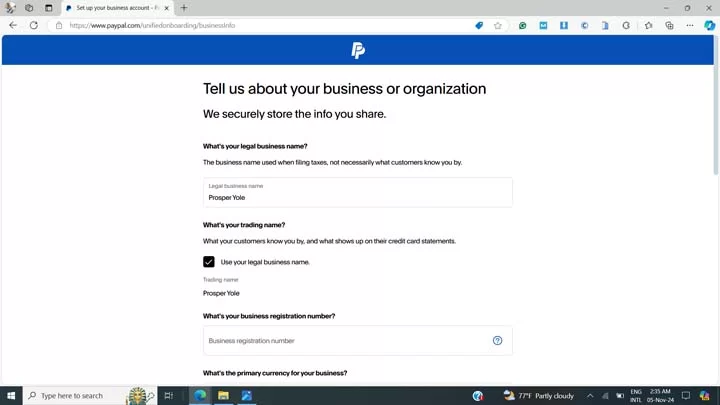
- Next, select “US Dollar” as your primary currency. (shown below)
- Select the service option that best matches what you plan to use your account for. For example, select “Miscellaneous Publishing and Printing”, “Digital Goods”, or Miscellaneous Personal Services” options if you are a freelancer, as may be relevant to your services.
- Next, if you have a business website, select “Yes” and enter your website in the form field; otherwise, select “No”.
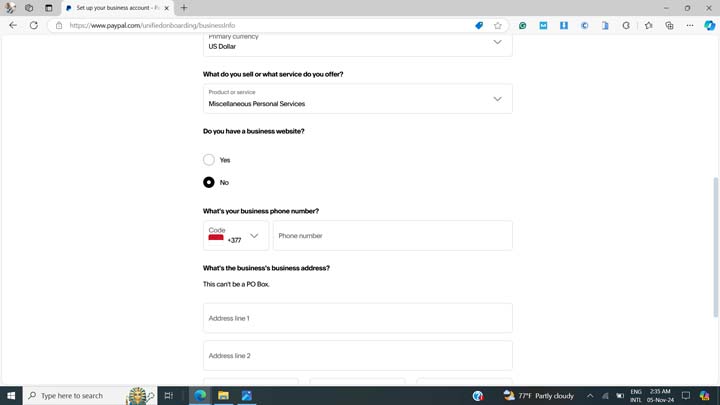
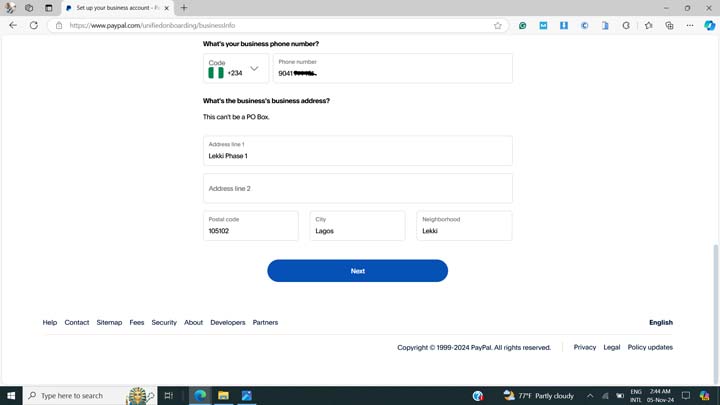
- In the form field above, enter your valid phone number starting with +234 and without the first zero.
- Then, enter your business or current residential address, postal code, and other relevant fields, and click the “Next” button below.
- In the next session (shown below), enter your date of birth and select Nigeria as your nationality. Ensure the date of birth matches the details in your valid identity document.
- Next, type in your residential address or tick the checkbox beside “Same as registered business address”, especially if you don’t have a dedicated business address.
- Finally, click on the “Next” button to complete your registration.
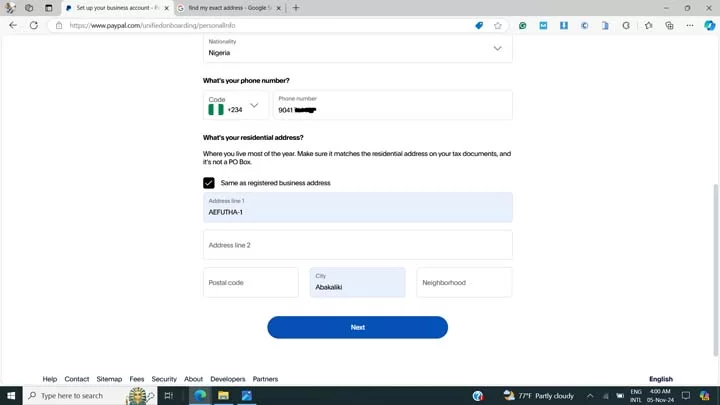
That’s all! You now have a fully functional PayPal account for sending and receiving money. The next step will be to set it up to withdraw money to your local account.
PayPal may ask you to verify some tax information about your business. Answer all tax questions truthfully, as applicable, and proceed. If any identity documents are required, submit them as applicable.
Lastly, go to Account Settings>Account Preferences and update your preferred language from Français to English.
How To Withdraw From a Business PayPal Account
Withdrawing from a business PayPal account does not require any linkage with Paga. What you need is a US bank account provider that is accepted by PayPal, or an acceptable USD debit/credit card.
The best and working US bank account provider that works with PayPal is Cleva. And below are the steps:
Step 1: Creating Your Cleva Account
- Create a Cleva account by visiting this link using a mobile or desktop browser.
- Fill in your registration details as appropriate. Ensure the details correspond with your official identity document (NIN, Voters’ card, or International Passport).
- Then, confirm your registration by clicking on the link sent to your email.
- Next, upload any official document as may be required. NIN is okay if you have it.
- After submitting the required documents, it will take around 24 hours for your account to be verified.
- Once verified, you will get an email saying “your account has been verified.”
- Next, log in to your GetCleva account or download the app from the Play Store or App Store.
- After signing in, find the link to open a US bank account in one click. Proceed to create your US account.
- You also have the option to create a US Dollar Mastercard you can use for other transactions
Step 2: Linking Cleva to PayPal
- Log in to your PayPal account using any country’s PayPal login page.
- Navigate to the “Pay and Get Paid” tab or click on the “Transfer Money” link on your dashboard if you have already received some money into the account.
- Select the option to add a bank account.
- Retrieve the bank details by logging in to your GetCleva dashboard or the mobile app.
- In the Cleva dashboard, click on Add Funds.
- Find your account details such as bank name, routing number, account type, etc.
- Note your routing number and account number.
- Re-open the PayPal page that is requesting the bank details
- Select “Checking” as your account type, and enter the bank details (routing number and account number) copied from the Cleva dashboard
- Finally, click on the submit button.
- If the bank details do not verify successfully, contact Cleva customer support for help
- If everything worked well, PayPal will send a micro-deposit to your GetCleva account 1-2 days later and ask you to enter the amount of the micro-deposit in a form on the PayPal platform. This is for verification purposes, and you will get an email notification when the micro-deposits return to your Cleva account.
- Now, your US bank account is successfully linked, and you can start sending, receiving, and withdrawing money using your PayPal account.
How to Receive Money Through PayPal in Nigeria
To receive money through PayPal in Nigeria, give the sender the email address or mobile number connected to your account. According to PayPal’s official receiving instructions, new Nigerian customers must link their accounts to a licensed local partner before they can receive money.
To receive money through PayPal in Nigeria, you can provide your PayPal email to the sender, who will send money to it from their PayPal account. You can also use the newly introduced PayPal @ tag. Once you set it up, you will have a tag, for example, @knowseeker.
After the money has entered the PayPal account, you can then withdraw using any of the withdrawal methods above. Using the Paga app, you can view your PayPal balance and withdraw into your Paga wallet.
Here is something you may find interesting. If you do not have a PayPal account, PayPal also makes it possible to send and receive PayPal payments without an account, especially in situations where opening a new account or using PayPal directly may be difficult.
Note that you cannot receive money into your PayPal account from bank wire, card transfer, or other transfer services in Nigeria.
How to Withdraw Money From PayPal in Nigeria
Withdrawing money from PayPal is easy and straightforward. But the procedure is slightly different for Paga and Business PayPal methods.
Withdrawing from Paga
- Ensure your PayPal is connected to Paga using the Paga app
- Tap on the currency selection at the top right corner of the app, and select PayPal
- Select the PayPal balance
- Enter the amount to withdraw
- Review the exchange rate and charges
- Confirm the transaction
- Then, transfer the resulting Naira balance to a Nigerian bank for withdrawal
Paga charges $3 + 3% of the withdrawal fee when transferring from PayPal.
Transfer from Paga Naira account to your linked local Naira account is free for the first 10 transactions per month. From the 11th transaction onward, applicable fees are charged.
Withdrawing Through Cleva
- Log in to your PayPal account via the app or web
- Click on Transfer under your balance
- Enter the desired amount to withdraw (for decimal points, use a comma instead of a full stop–e.g., $10,45 instead of $10.45
- Then wait for the transfer to arrive in your Cleva account. This takes 1-3 business days (usually within a day)
- The above transaction is usually free, but Cleva now charges a flat $2 fee from the amount withdrawn
- Once it arrives, they will notify you
- Log in to your Cleva app and click on Transfer
- Enter your own bank details
- Enter the amount to transfer while reviewing the exchange rate
- Click on Continue
- The transfer is free and arrives within seconds (but the bank may charge stamp duty).
How to Avoid PayPal Account Limitations
To avoid PayPal from limiting your account, follow the following tips:
- Use your real country and address
- Use your correct phone number and email
- Avoid using the same phone number for multiple accounts
- Do not use a VPN during registration or usage
- Use your legal names and personal details
- Respond honestly to tax and identity verifications
- Use your account for legitimate businesses only (know the source of the money)
- Avoid buying a pre-created PayPal account
Alternatives to PayPal in Nigeria
Common alternative ways to receive money from your international clients include the following:
- Payoneer
- Grey
- ChipperCash
- Geegpay
- Cleva
- Crypto transfer
- Raenest
- Bank transfer via SWIFT/BIC to a domiciliary account
- Western Union
The major limitation to these is that some of these platforms are not widely adopted internationally yet.
Another option is peer-to-peer, if you have friends or relatives living abroad with a functional PayPal account who can wire money to Nigeria. They can help you convert it and send it to you.
There are also close individuals who can help you receive and withdraw the funds with their functional PayPal account at an agreed fee.
Common PayPal Problems and How To Fix Them in Nigeria
1. PayPal Not Connecting With Paga
This occurs when there is a mismatch between the supplied PayPal details and Paga personal details. To fix this, ensure both accounts use matching legal details. Other things to consider include disabling a VPN, completing verification on both accounts, and retrying using a stable internet connection.
Avoid creating another account or falsifying information. Rather, contact the appropriate support agent for assistance.
2. Paga Does Not Show the PayPal Option
If Paga does not show the PayPal icon, consider updating the app and completing Paga KYC. If the issue persists, log out of PayPal on Paga and log back in. If nothing works, contact support.
3. Pending or Delayed PayPal Withdrawal
Delayed transactions on PayPal are usually due to review by PayPal’s automated systems. Transactions usually take between 1 and 3 days, but if it persists longer, you might need to contact support.
4. PayPal Account Limits
For limits, review your earlier transactions and contact the Resolution Centre. PayPal support can help you lift the limitation, but there is no guarantee that all the limits will be removed.
Frequently Asked Questions
Will my PayPal account be blocked?
No, PayPal only blocks or limits accounts when they detect suspicious activity, and you are unable to verify your identity after they request verification.
How is a personal account different from a business account?
A personal account allows money gifts and doesn't charge any fee for these transactions. However, all transfers to or from a business are considered transactional and require transaction fees. PayPal officially allows Nigerians to create a personal account, but the unified business registration page once worked seamlessly in the past.
How much does PayPal charge when transferring money to a linked bank account?
PayPal generally does not charge any fee when transferring money to your linked bank account. However, if you are using Cleva, the platform may charge 0.9% for ACH transfers, with a minimum of $2 and a maximum of $20.
Can I contact PayPal support if I experience any issues?
Yes, you can safely contact support when you have any issues without being afraid of getting blocked or limited. Only do business with verifiable sources, and provide the necessary documents when requested.
How much does PayPal charge for receiving money?
PayPal charges around 2.99% for business transactions received. So, if you receive $200, the final amount may be around $194.02.
Are Nigerian debit cards supported on PayPal for withdrawal?
No. Not all cards are supported for withdrawals. Some only work for sending, not for withdrawal, even if successfully linked.
Do I need a tax ID or EIN for PayPal in Nigeria?
Not necessarily, but you need to keep your tax ID handy in case of any verification requests. The new Paga integration creates an official way to verify business documents, including your tax ID.
What should I do if PayPal requests verification frequently?
Regular verification requests show that your PayPal account is likely associated with suspicious activity, e.g., an unusually large amount of money, reusing a password on another account, etc. When this happens, ensure you provide the required documents or details.
Is Paga or Cleva account creation free?
Yes, opening a Paga or Cleva account is completely free. Charges apply to transactions at specified rates.
Final words
Opening a PayPal account in Nigeria is now more straightforward than it previously was. You can now register a personal or business account using your genuine Nigerian details, a process that has been facilitated by the PayPal-Paga partnership.
With the above methods, you can create a fully functional PayPal account within minutes. The personal PayPal account + Paga integration was personally completed by me in September 2026. However, PayPal may change the appearance or order of the registration screens over time.
If this guide helped you, let me know in the comments section below, and share it with a freelancer who might need it. If you have any questions or challenges, also share them in the comments below.













You Might Also Like