Withdrawing money from PayPal in Nigeria used to be a major challenge. For years, Nigerians could create PayPal accounts and make international payments, but receiving money and withdrawing it to a Nigerian bank account was a different story.
Things have changed in 2026.
Following the partnership between PayPal and Paga, Nigerians can now receive eligible international PayPal payments and withdraw their funds in Naira without necessarily using a foreign PayPal account or an independent exchanger.
However, there is something important you should know: PayPal is still not fully available in Nigeria. Even with the Paga integration, Nigerian PayPal accounts cannot receive every type of payment, particularly automated payouts from international platforms.
In this guide, we will explain how to withdraw PayPal money in Nigeria using Paga, how withdrawals work with foreign PayPal setups, and the limitations you should understand before choosing either method.
Can You Withdraw Money From PayPal in Nigeria?
Yes, you can withdraw money from PayPal in Nigeria. If you have a Nigerian PayPal account connected to Paga, you can withdraw your USD balance into your Paga wallet and receive the equivalent amount in Naira.
For foreign PayPal accounts, the process is different. You cannot link a foreign PayPal account to Paga, so you must use the withdrawal methods supported in the country where your PayPal account is registered.
For instance, if your PayPal account is registered in a country that supports linking US bank accounts, you may be able to withdraw through USD receiving accounts provided by fintech platforms like Cleva, Grey, or Raenest.
These platforms have made PayPal withdrawals possible for some Nigerians with supported foreign PayPal accounts long before the Paga integration. However, linking these bank accounts to PayPal does not always work. Some users still encounter difficulties because PayPal has specific requirements for the bank accounts it accepts.
Current Status of PayPal in Nigeria
PayPal has been available in Nigeria since 2014, although its services were initially limited mainly to sending money and making online payments.
In January 2026, PayPal partnered with Paga to expand its services in Nigeria, making it possible for eligible Nigerian users to receive international payments and withdraw their PayPal balances locally.
This is a significant improvement, particularly for freelancers, remote workers, and individuals who receive payments from abroad.
Let’s look at the features currently available.
Sending Payments
Nigerians can use PayPal to make payments to eligible international PayPal accounts.
For example, if you want to pay someone abroad for a service or make a purchase on a website that accepts PayPal, you may be able to complete the transaction using your PayPal account and a supported payment method.
You can also link eligible debit or credit cards to your account for online payments.
Receiving Payments
Receiving payments is one of the biggest improvements introduced through the PayPal–Paga partnership.
Nigerians can now receive eligible payments from international PayPal users after linking their Nigerian PayPal accounts to Paga and completing the required verification.
For example, a client abroad can log in to their PayPal account, enter your registered PayPal email address, and be able to send you payment.
For this to work, the client needs to send the money as a Goods and Services payment.
After the payment clears, you can withdraw the money from PayPal to your Paga wallet.
However, receiving money directly from another PayPal user is not the same as receiving automated payouts from an international platform.
This brings us to the limitations Nigerian PayPal users should understand.
Limitations of PayPal in Nigeria
Despite the improvements introduced in 2026, PayPal Nigeria still operates with several restrictions.
These limitations can affect how you receive money, make payments, and withdraw your funds.
1. Nigerian PayPal accounts cannot receive all payments
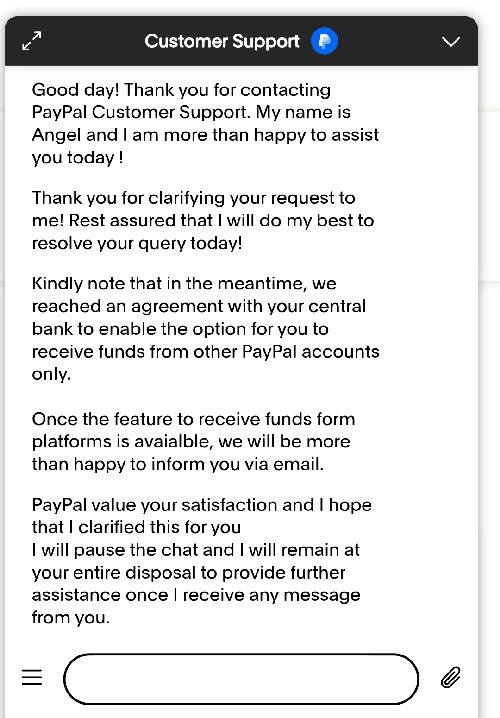
This is one of the most important limitations that many users may not be aware of.
The PayPal–Paga integration does not currently support automated PayPal payouts from international platforms.
For example, if you are a content creator trying to receive Facebook earnings, a Nigerian PayPal account may link successfully at first, but it will not be able to receive the payments because Facebook payments are automated.
The same issue affects platform payment systems that rely on unsupported automated PayPal disbursements.
I have personally confirmed this restriction with PayPal customer support. Other Nigerian publishers have also reported similar difficulties receiving automated payments.
It is also consistent with PayPal’s official Payouts documentation, which does not currently list Nigeria among the countries eligible to receive payments through that particular service.
The distinction is important.
A client manually sending you an eligible payment from their PayPal account is different from a company using PayPal’s automated payout infrastructure to distribute earnings.
2. PayPal Checkout is not available for Nigerian accounts
Although Nigerian PayPal users can receive certain Goods and Services payments, this does not mean they can integrate PayPal Checkout into their websites.
According to Paga, connecting your Nigerian PayPal account does not currently enable PayPal Checkout.
This means the integration does not automatically allow Nigerian merchants to accept payments through PayPal’s website checkout system.
PayPal Checkout and manually initiated Goods and Services payments are separate payment experiences, and the availability of one does not guarantee the availability of the other.
3. You cannot transfer money between Nigerian PayPal accounts
You cannot send money from one Nigerian PayPal account to another, even if both accounts are connected to Paga.
While you can receive payments from international PayPal users, sending money to another Nigerian PayPal user is still restricted.
If you need to send money to someone in Nigeria, you can withdraw it to your Paga wallet and transfer it to their Nigerian bank account instead.
4. Other limitations
Nigerian PayPal accounts still lack several features available to US users. These include PYUSD, PayPal Savings, PayPal Debit Card, Pay Later, and cryptocurrency trading.
You also cannot withdraw directly to a Nigerian bank account or fund your PayPal balance through Paga. Withdrawals through Paga have minimum and maximum limits, while transaction fees and currency conversion charges apply.
PayPal may also hold payments or restrict accounts that require additional verification.
You can check the detailed status of PayPal in Nigeria for its availability and limitations.
Withdrawing Funds Using PayPal–Paga in Nigeria
The PayPal–Paga integration is the most straightforward option for withdrawing funds from a Nigerian PayPal account.
Paga is a Nigerian financial technology company that provides digital wallets and payment services.
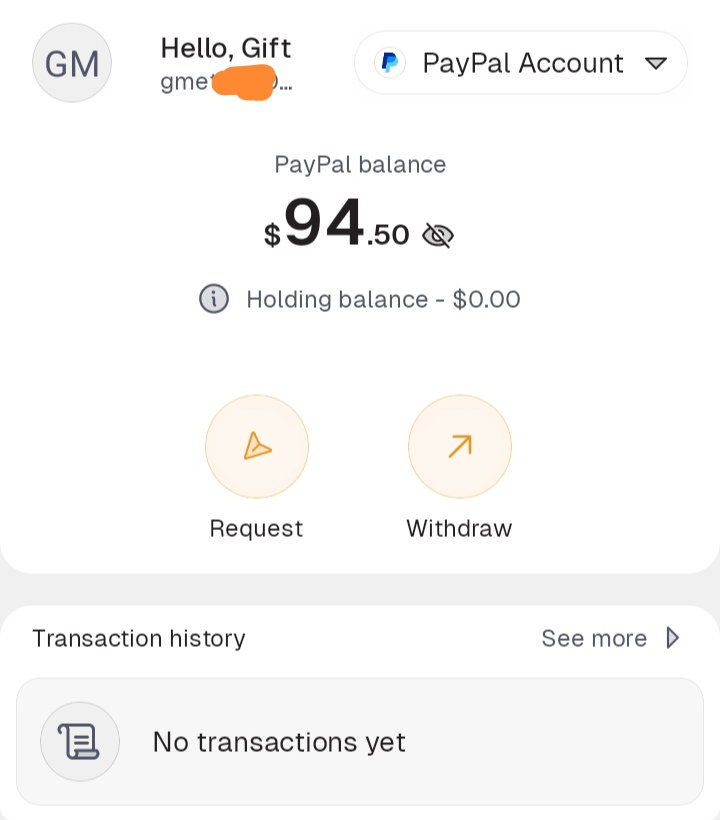
Through its partnership with PayPal, Nigerian users can connect their PayPal accounts to Paga, view their available balances, and withdraw their money in Naira.
You will need a verified Nigerian PayPal account, an active Paga account, and an available PayPal balance to get started.
Step 1: Create a Paga Account
If you already have a verified Paga account, you can skip this step.
Otherwise, download the Paga app from the Google Play Store or Apple App Store.
Open the app and create an account using your Nigerian phone number and personal details.
Complete the required identity verification, including your NIN and any additional information requested.
Once your account is verified, you can proceed to link it to PayPal.
Step 2: Connect Your PayPal Account to Paga
Log in to your Paga app and locate the currency or country icon on the dashboard.
Select the option to add or connect a PayPal account.
Then:
- Tap Add PayPal Account.
- Select Connect PayPal.
- Enter your PayPal login details on the official PayPal authentication page.
- Review and approve the connection.
- Return to Paga to confirm that your account has been linked.
You should now be able to view your available PayPal balance from your Paga account.
If you do not have a Nigerian PayPal account, Paga also provides an option to create one during the linking process.
Step 3: Withdraw Your PayPal Funds to Paga
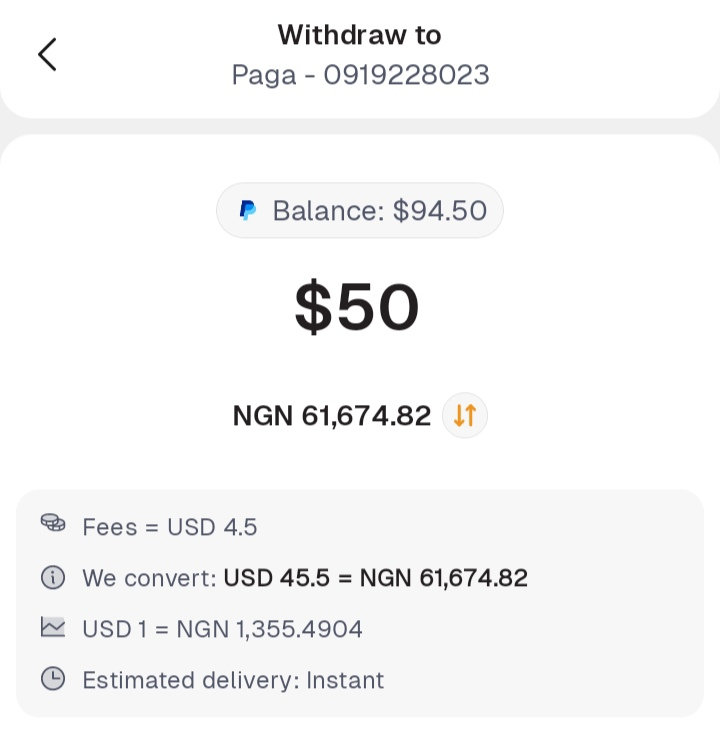
Once your PayPal account is connected, you can proceed with the withdrawal.
- Open the Paga app and select your connected PayPal account.
- Choose the option to withdraw from your PayPal balance.
- Enter the amount you want to withdraw.
- Review the applicable withdrawal fees and USD-to-NGN exchange rate.
- Confirm the transaction.
Paga will process the withdrawal and credit your Naira wallet with the corresponding amount.
According to Paga, withdrawals are usually completed instantly or within a few minutes, although PayPal reviews or account restrictions can cause delays.
Step 4: Transfer the Money to Your Nigerian Bank Account
After receiving the money in your Paga Naira wallet, you can transfer it to a Nigerian bank account.
Open the transfer section in Paga, select the bank transfer option, and provide the recipient’s bank details.
Enter the amount you want to transfer, review any applicable charges, and confirm the transaction.
You’ll now have the balance in your Nigerian bank account.
PayPal–Paga Withdrawal Fees and Limits
If you’re withdrawing money from PayPal through Paga, here are the fees and limits you should know:
- Withdrawal fee: $3 plus 3% of the withdrawal amount.
- Minimum withdrawal: $4.
- Maximum withdrawal: $5,000.
- Supported currency: USD.
- Processing time: Usually instant or within a few minutes.
For example, if you already have $100 available in your PayPal balance and decide to withdraw the entire amount:
The 3% charge would be $3. Adding the fixed $3 fee brings the total withdrawal charge to $6.
You would therefore receive the Naira equivalent of approximately $94, based on the applicable exchange rate, assuming no additional charges.
Remember that these calculations concern withdrawing an existing PayPal balance. Any fees charged when you originally received the payment are separate.
You can check Paga’s official PayPal help centre for the latest withdrawal fees and limits.
Withdrawing Funds From Foreign PayPal Setup in Nigeria
Before the recent PayPal-to-Paga integration, Nigerians used to operate foreign PayPal accounts, and some of them managed to find smooth ways to withdraw their funds.
The withdrawal method usually depends on the country of the PayPal account and the type of bank account available, such as a US bank account, a Pound bank account, or a Euro bank account.
Withdrawing from a foreign PayPal account is much harder because that PayPal setup is not meant for your own country. So, Paga’s withdrawal option is the most straightforward.
Nevertheless, I will share the methods I have personally tested and that work.
Method 1: Withdraw Through FinTech Platforms Such as Cleva
Cleva is a financial technology platform that provides users with USD receiving accounts and local currency transfer services.
It is one of the options discussed in our comprehensive guide to opening and using PayPal accounts in Nigeria.
If your PayPal account supports withdrawals to a US bank account, you may be able to link compatible Cleva USD banking details and transfer your money through that route.
Here is how the process works.
Step 1: Create a Cleva account
Start by creating your Cleva account.
Provide the required registration details and complete the identity verification process.
Your information should match your official identity documents.
Once your account is approved, open your USD receiving account and obtain its bank details.
These normally include the bank name, routing number, account number, and account type.
Step 2: Link Cleva to PayPal
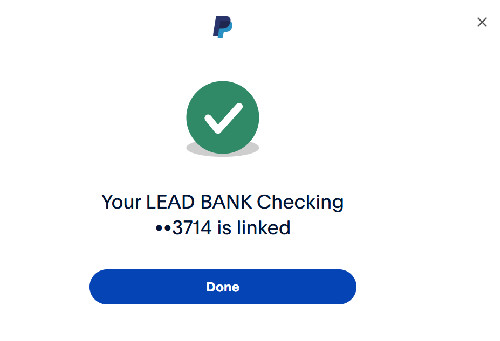
Log in to your PayPal account.
Navigate to the Wallet or Money section and select the option to link a bank account.
Enter the USD bank details provided by Cleva.
If PayPal requires verification, it may send small deposits to your Cleva account.
Check the deposits and enter the requested amounts in PayPal to complete the verification.
Step 3: Transfer Your PayPal Funds to Cleva
Once you’ve successfully linked your Cleva account, return to your PayPal balance.
Select the transfer option, choose the linked Cleva account, and enter the amount you want to withdraw.
Review the transaction details and confirm.
Step 4: Withdraw From Cleva to Your Nigerian Bank Account
Once the funds arrive in your Cleva USD account, open the Cleva app.
Navigate to the transfer section and select the option to send money to your Nigerian bank account.
Enter the amount, review the exchange rate and applicable fees, and confirm the transfer.
Note: There are many platforms that can provide you with USD, euro, and pound receiving details. Some of them are Grey, Raenest, Cleva, and WorldFirst. Feel free to explore them if Cleva does not work for you.
Method 2: Withdraw Using an Eligible Debit Card
Depending on your PayPal account’s country and available features, you may also be able to withdraw money to a supported debit card.
If card withdrawals are available, open your PayPal Wallet, link an eligible card, and select it when transferring your balance.
The funds will be sent to the card according to PayPal’s applicable processing times and fees.
Not all cards support withdrawals, even when they can be linked successfully for making payments.
Method 3: Exchange Your PayPal Balance for Naira
Using a PayPal exchanger is one of the most common ways Nigerians withdraw money from foreign PayPal accounts.
As mentioned earlier, linking a bank account to a foreign PayPal account isn’t that easy. Most of the USD/Euro/Pounds account providers available to Nigerians are fintech platforms offering virtual bank accounts, which PayPal sometimes rejects. This is why many people still use PayPal exchangers.
A PayPal exchanger, also called a PayPal vendor, receives your PayPal funds and sends the Naira equivalent to your Nigerian bank account at an agreed exchange rate.
One example is SVZ Finance, also known as SVZ Exchange. Apart from exchanging PayPal balances for Naira, the service can also receive international PayPal payments on your behalf if you don’t have a PayPal account.
There are many PayPal exchangers online, but you need to be careful when choosing one. Check reviews from previous customers, confirm the exchange rate and any charges, and make sure you’re dealing with a trustworthy vendor before sending your money.
How can I create a PayPal account in Nigeria?
You can create a PayPal account in Nigeria through the official PayPal website or Paga. You'll need a valid email address, an active Nigerian phone number, and your personal details for registration and verification.
After registration, connect your account to Paga to receive international payments and withdraw your money.
For the complete process, follow our step-by-step guide on how to open a working PayPal account in Nigeria.
Can I withdraw PayPal funds directly to a Nigerian bank account?
Yes, you can withdraw PayPal funds to a Nigerian bank account through the PayPal–Paga integration.













You Might Also Like